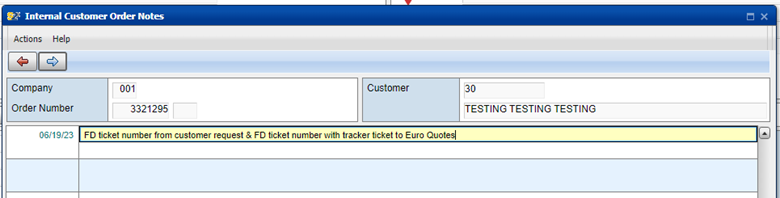
1. Start Euro Quote in S2K under the customer account
Order Entry process can be found here: Order Entry Job Aid
2. Keep your FreshDesk ticket assigned to you
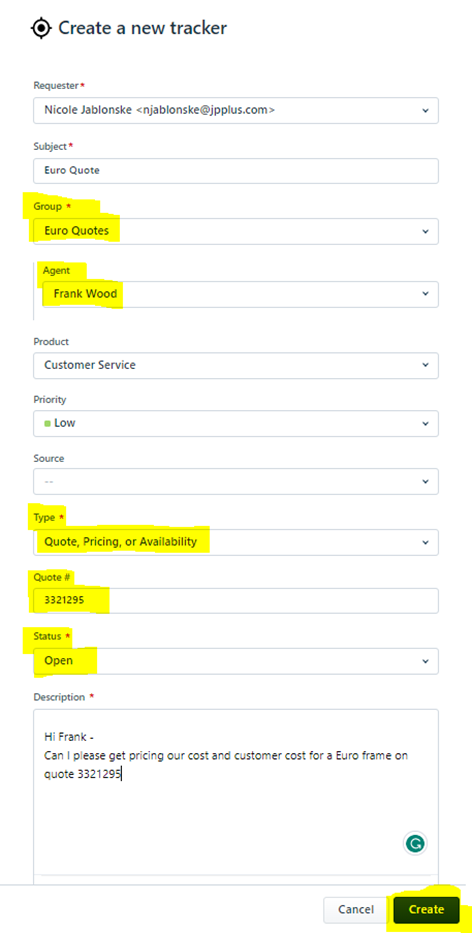
3. Create a Tracker ticket (to the right under Linked Tickets) in FreshDesk

4.
How to create a tracker ticket”: 1. Group: Euro Quote 2. Agent: Frank Wood 3. Type: Quote, Pricing, or Availability 4. Quote #: must be filled in with your S2K quote # 5. Status: OPEN 6. Description of what is needed 7. Create
|
5. Frank will update the ticket to the correct pricing and update any sizing that needs it, once completed he will respond back to the tracker once the update has been completed.
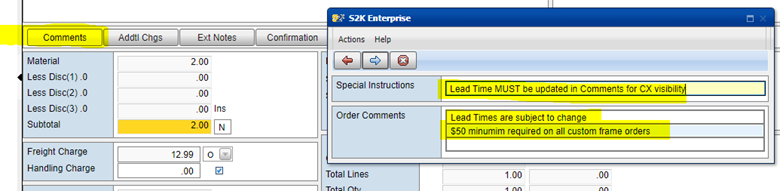
6. Comments field is required on all custom frame quotes/orders.
- Communicate estimated lead times & order minimums. Frame lead times can be found in the shared Simply Frame Excel spreadsheet labelled Simply Conversion, then select the tab labelled - 2026 Lead Times.
8. EXT notes must contain all FD ticket numbers associated to quote/order (Customer FD ticket & ticket to Euro Quote group)